Kia Sportage: High Beam Assist (HBA)
Kia Sportage - Fifth generation (NQ5) - (2022-2026) - Owner's Manual / Features of your vehicle / Lighting / High Beam Assist (HBA)
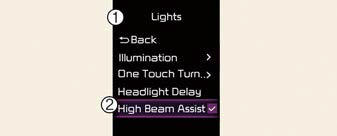
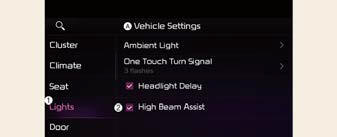
A: Vehicle Settings
- Lights
- High Beam Assist
With the ENGINE START/STOP button in the ON position, select 'Lights ? High Beam Assist' from the Settings menu to turn on High Beam Assist and deselect to turn off the function.
WARNING
For your safety, adjust your high beam settings only after parking the vehicle at a safe location.
High Beam Assist operation
Display and control
- After selecting 'High Beam Assist' in the Settings menu, High Beam Assist will operate by following the procedure below.
- Place the headlamp switch in the
AUTO position and push the headlamp
lever towards the instrument
cluster. The High Beam Assist (
 )
indicator light will appear on the
cluster and the function will be
enabled.
)
indicator light will appear on the
cluster and the function will be
enabled. - When the function is enabled, high
beam will turn on when vehicle
speed is above 25 mph (40 km/h).
When vehicle speed is below 15 mph (25 km/h), high beam will not turn on.
- The High Beam () indicator
light
will appear on the cluster when
high beam is on.
- When High Beam Assist is operating, if the headlamp lever or switch is used, the function operates as follows:
- If the headlamp lever is pulled
towards you when the high beam is
off, the high beam will turn on without
High Beam Assist canceled.
When you let go of the headlamp lever, High Beam Assist will turn on again.
- If you push the light switch towards the instrument cluster, high beam is turned on and High Beam Assist is released.
- If the headlamp lever is pulled towards you when the high beam is on by High Beam Assist, low beam will be on and the function will turn off.
- If the headlamp switch is placed from AUTO to another position (headlamp/position/off), High Beam Assist will turn off and the corresponding lamp will turn on.
- When High Beam Assist is operating, high beam switches to low beam if any of the following conditions occur:
- When the headlamp of an oncoming vehicle is detected.
- When the taillamp of a vehicle in front is detected.
- When the headlamp or taillamp of a motorcycle or a bicycle is detected.
- When the surrounding ambient light is bright enough that high beams are not required.
- When streetlights or other lights are detected.
READ NEXT:
 Malfunction and limitations
Malfunction
A: Check High Beam Assist (HBA) system
When High Beam Assist is not working
properly, the 'Check High Beam Assist
(HBA) system' warning message will
appear and warning lig
Wipers and washers
The wipers and washers remove foreign
substances from the windshield and rear
window, helping to maintain visibility.
A: Wiper speed control
MIST - Single wipe
OFF - Off
INT - Inter
Auto control
The rain sensor (A) located on the upper
end of the windshield glass senses the
amount of rainfall and controls the wiping
cycle for the proper interval. The
more it rains, the faster the wipe
SEE MORE:
Line Pressure Control Solenoid Valve | 35R Clutch Control Solenoid Valve (35R/C_VFS)
Description and Operation
Description
Line pressure control solenoid valve is attached to the valve body. This variable force solenoid valve directly controls the hydraulic pressure inside the line pressure.
Specifications
Specifications
Direct control VFS [LINE Pressure]
Contro
Repair procedures
Refrigerant System Service Basics
Refrigerant Recovery
Use only service equipment that is U.L-listed and is certified to meet the
requirements of SAE J2210 to remove
4FC-134a(R-134a) from the air conditioning system.
CAUTION
Air conditioning refrigerant or lubricant vapor can irritat
Content
- Home
- Kia Sportage - Fifth generation (NQ5) - (2022-2026) - Owner's Manual
- Kia Sportage - Second generation (JEKM) (2005-2015) - Body Workshop Manual
- Kia Sportage Third generation (SL) - (2011-2016) - Service and Repair Manual
- Sitemap
- Top articles
