Kia Sportage: Components and Components Location | Description and Operation
Components
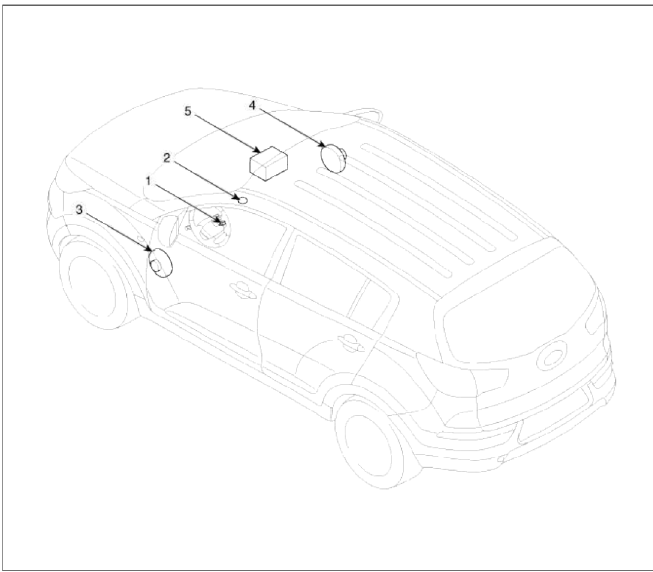
- Hands free call switch
- Mic
- Front left speaker
- Front right speaker
- Audio head unit (hands free control)
There is no hands free jack. This system supports Ð’luetooth (wireless system).
Description and Operation
Function
Bluetooth Audio System
Bluetooth
You can use a Bluetooth device in your car to make a hands-free phone call or to stream music onto your in-car speakers (via tins Head Unit). This Head Unit supports HFP, A2DP and AVRCP connection.
Advanced Audio Distribution Profile (A2DP)
This profile defines how high quality audio (stereo or mono) can be streamed from one device to another over a Bluetooth connection. For example: music streamed from a mobile phone to a wireless headset or car audio.
Audio/Video Remote Control Profile (AVRCP)
This profile is designed to provide a standard interface to control TVs, Hi-fi equipment, etc. to allow a single remote control (or other device) to control all of the AV equipment to which a user has access. It may be used in concert with A2DP or VDP.
Hands-Free Profile (HFP)
This is commonly used to allow car hands-free kits to communicate with mobile phones in the car.
Notes for mobile phones
Some functions (e.g. starting of speech recognition) are not supported by all mobile phones. We cannot guarantee that all functions described will be supported by all mobile phones with Bluetooth.
New device
This function allows you to add a new phone to the Head Units Bluetooth Device List. Maximum of 5 devices can be added to the list. If the list is full, the oldest device will be replaced by the newly added Bluetooth device, based on last pairing date.
Voice Recognition Activation
- The voice recognition engine contained in the Bluetooth System can be activated in the following conditions:
- Button Activation
The voice recognition system will be active when the
 button is pressed and after the sound of a Beep.
- Active Listening
The voice recognition system will be active for a period of time when the Voice Recognition system has asked for a customer response.
- The system can recognize single digits from zero to nine while number greater than ten will not be recognized.
- If the command is not recognized, the system will announce "Pardon" or No input voice signal from microphone.
(No response)
- The system shall cancel voice recognition mode in following cases: When pressing the
 button and saying cancel following the beep. When not making a call and pressing the
  button. When voice recognition has failed 3 consecutive times.
 - At any time if you say "help", the system will announce what commands are available.
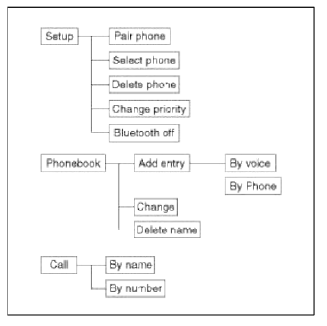
Menu tree
READ NEXT:
 Hands Free Switch | Hands Free Mic
Components and Components Location
Component Location
[Audio + Cruise + Bluetooth]
[Audio + Cruise + Bluetooth]
Repair procedures
Inspection
1. Check the handsfree remote control
SEE MORE:
Consumer Assistance (U.S. only)
Roadside Assistance is provided on all
new current model year Kia Vehicles
from the date the vehicle is delivered to
the first retail buyer or otherwise put into
use (inservice date), whichever is earlier,
for a period of 60 months or 60,000
miles, whichever is earlier, subject to the
terms,
Cleaning the upholstery and interior
trim
Car interior surfaces
Remove dust and loose dirt from interior
surfaces with a whisk broom or a vacuum
cleaner. If necessary, clean interior
surfaces with a mixture of warm water
and mild non-detergent cleaner (test all
cleaners on a concealed area before
use).
Fabric
Remove dust and loose
Content
- Home
- Kia Sportage - Fifth generation (NQ5) - (2022-2026) - Owner's Manual
- Kia Sportage - Second generation (JEKM) (2005-2015) - Body Workshop Manual
- Kia Sportage Third generation (SL) - (2011-2016) - Service and Repair Manual
- Sitemap
- Top articles
