Kia Sportage: Climate control air filter
Kia Sportage - Fifth generation (NQ5) - (2022-2026) - Owner's Manual / Maintenance / Climate control air filter
Filter inspection
The climate control air filter should be replaced according to the maintenance schedule. If the vehicle is operated in severely air-polluted cities or on dusty rough roads for a long period, it should be inspected more frequently and replaced earlier. When you replace the climate control air filter, replace it performing the following procedure, and be careful to avoid damaging other components.
Operation
- Open the glove box and remove the stopper (1).
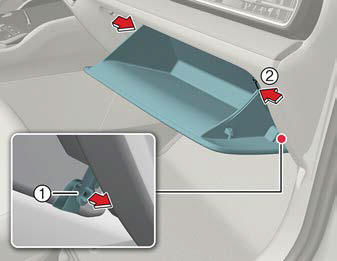
- With the glove box open, pull the support strap.
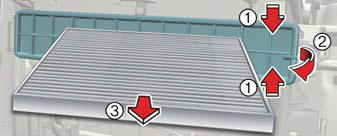
- Remove the climate control air filter cover by pulling out both sides of the cover.
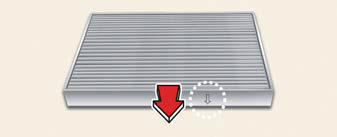
- Replace the climate control air filter.
- Assemble in reverse order.
NOTICE
When replacing the climate control air filter install it properly. Otherwise, the system may produce noise and the effectiveness of the filter may be reduced.
READ NEXT:
 Blade inspection
When the wipers no longer clean adequately,
the blades may be worn or
cracked, and require replacement.
To prevent damage to the wiper arms or
other components, do not attempt to
move the wiper
Blade replacement
When the wipers no longer clean adequately,
the blades may be worn or
cracked, and require replacement.
CAUTION
To prevent damage to the wiper arms or
other components, do not attempt to
move th
SEE MORE:
Audio system
NOTICE
If you install an aftermarket HID headlamp,
your vehicle's audio and electronic
device may malfunction.
* If your vehicle is equipped with infotainment
system, refer to a separately
supplied manual for detailed information.
Sharkfin antenna
The sharkfin antenna transmits and
Components and Components Location | Front Strut Assembly
Components Location
Front axle
Front lower arm
Drive shaft
Stabilizer bar
Steering gearbox
Sub frame
Front strut assembly
Front Strut Assembly
Components and Components Location
Components
Strut assembly
Insulator
Bearing
Content
- Home
- Kia Sportage - Fifth generation (NQ5) - (2022-2026) - Owner's Manual
- Kia Sportage - Second generation (JEKM) (2005-2015) - Body Workshop Manual
- Kia Sportage Third generation (SL) - (2011-2016) - Service and Repair Manual
- Sitemap
- Top articles
