Kia Sportage: Forward Collision-Avoidance Assist operation
Basic function
The basic function for Forward Collision- Avoidance Assist is warned and controlled by the following level.
- Collision Warning
- Emergency Braking
- Stopping vehicle and ending brake control
Collision Warning
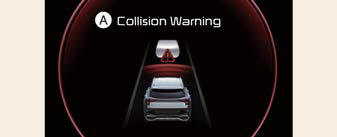
- Collision Warning
The warning message, and an audible warning will warn the driver of a collision.
Collision Warning will be activated at the following speed of your vehicle, depending on the object.
- For Vehicle: 3~112 mph (5~180 km/h)
- Pedestrian or cyclist: 3~53 mph (5~85 km/h)
Emergency Braking
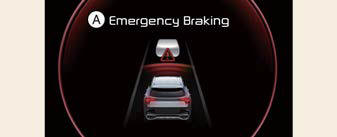
- Emergency Braking
The warning message, and an audible warning will warn the driver that emergency braking will be assisted. The brake assist will be activated and it helps avoiding collision of a vehicle, pedestrian and cyclist.
Emergency Braking will be activated in following speed of your vehicle, depending on the object.
- For Vehicle: 3~53 mph (5~85 km/h)
- For Pedestrian or cyclist: 3~40 mph (5~65 km/h)
Stopping vehicle and ending brake control
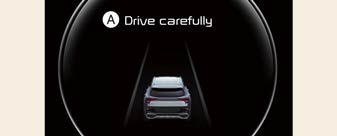
- Drive carefully
When the vehicle is stopped due to emergency braking, the warning message will appear on the cluster.
For your safety, the driver should depress the brake pedal immediately and check the surroundings.
- Brake control will end after the vehicle is stopped by emergency braking for approximately 2 seconds.
Junction Turning function
Warning and control
The basic function for Junction Turning function is warned and controlled by the following level.
- Collision Warning
- Emergency Braking
- Stopping vehicle and ending brake control
Collision Warning
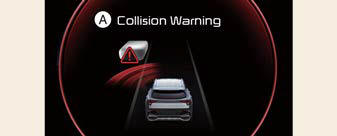
- Collision Warning
The warning message, and an audible warning will warn the driver of a collision.
Collision Warning will be activated in following conditions.
- Vehicle speed: 4~19 mph (7~30 km/h)
- Oncoming vehicle speed: 15 ~ 44 mph (25 ~ 70 km/h)
READ NEXT:
 Emergency Braking
Emergency Braking
The warning message, and an audible
warning will warn the driver that emergency
braking will be assisted. The
brake assist will be activated and it helps
avoiding colli
Forward Collision-Avoidance Assist malfunction and
limitations
Forward Collision-Avoidance Assist malfunction
Check Forward Safety system
When Forward Collision-Avoidance
Assist is not working properly, the warning
message will appear, and the (
)
SEE MORE:
Vehicle settings (infotainment system) (if equipped)
Press the Settings button on the head
unit of the infotainment system.
Select Vehicle and change the setting
of the features.
Vehicle Settings in the infotainment system
provides user options for a variety
of settings including door lock/unlock
features, convenience features, driv
Identification Number Locations/Description
Identification Number Locations
Identification Number Description
Vehicle Identification Number
World Manufacturer Identifier (WMI)
KNA: Passenger vehicle, MPV (Multipurpose Passenger Vehicle)/SUV
(Sports Utility
Vehicle) ZRV (Recreational Vehicle)
KNC: Commercial
Content
- Home
- Kia Sportage - Fifth generation (NQ5) - (2022-2026) - Owner's Manual
- Kia Sportage - Second generation (JEKM) (2005-2015) - Body Workshop Manual
- Kia Sportage Third generation (SL) - (2011-2016) - Service and Repair Manual
- Sitemap
- Top articles
