Kia Sportage: Leading Vehicle Departure Alert
Kia Sportage - Fifth generation (NQ5) - (2022-2026) - Owner's Manual / Driving your vehicle / Driver Attention Warning (DAW) / Leading Vehicle Departure Alert
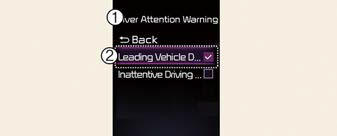
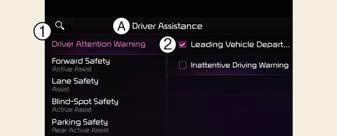
A: Driver Assistance
- Driver Attention Warning
- Leading Vehicle Departure Alert
Leading Vehicle Departure Alert: The function will inform the driver when the front vehicle departs from a stop.
Warning Timing
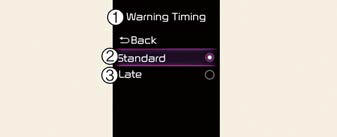
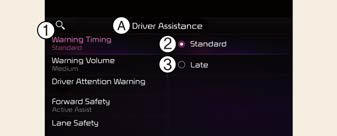
A: Driver Assistance
- Warning Timing
- Standard
- Late
With the vehicle on, select Settings ? Driver Assistance ? Warning Timing from the User Settings menu or select Settings? Vehicle ? Driver Assistance ? Warning Timing from the infotainment system to change the initial warning activation time for Driver Attention Warning.
- Standard: Use in a normal driving environment. If Driver Attention Warning operates too sensitive, set the warning timing to Late.
- Late: The warning timing will be late
NOTICE
- If you change the Warning Timing, the warning time of other Driver Assistance systems may change.
- If the vehicle is restarted, Driver Warning Time will maintain the last setting.
READ NEXT:
 Driver Attention Warning operation
Basic function
The basic functions of Driver Attention
Warning include:
Attention Level
Consider taking a break
Attention level
Function off
Driver Attention Warning
System Off
Driver Attention Warning malfunction and limitations
Driver Attention Warning malfunction
A: Check Driver Attention Warning
(DAW) system
When Driver Attention Warning is not
working properly, the warning message
will appear and ( ) warning ligh
Blind-Spot View Monitor (BVM)
Blind-Spot View Monitor settings
Blind-Spot View Monitor (BVM) (if equipped)
Left side
Right side
Blind-Spot View Monitor displays the
rear blind spot area of the vehicle in the
cluster
SEE MORE:
Warning lights
The warning light and indicator light
indicate a situation where the driver
should be careful and whether the various
functions are activated.
Warning lights
The warning light indicates situations
that require the driver to pay attention
NOTICE
Warning lights
Make sure that all warning lig
Tire replacement with TPMS
If you have a flat tire, the Low Tire Pressure
telltale will come on. Have the flat
tire repaired by an authorized Kia dealer
as soon as possible or replace the flat
tire with the spare tire.
CAUTION
Repair Agents
Never use a puncture-repairing agent
not approved by Kia to repair and/or
inf
Content
- Home
- Kia Sportage - Fifth generation (NQ5) - (2022-2026) - Owner's Manual
- Kia Sportage - Second generation (JEKM) (2005-2015) - Body Workshop Manual
- Kia Sportage Third generation (SL) - (2011-2016) - Service and Repair Manual
- Sitemap
- Top articles
