Kia Sportage: Luggage net holder
To keep items from shifting in the cargo area, you can use the 4 holders located in the cargo area to attach the luggage net (if equipped), or you can fold the luggage net into half and attach it upwards by using the additional 2 holders located on each side.
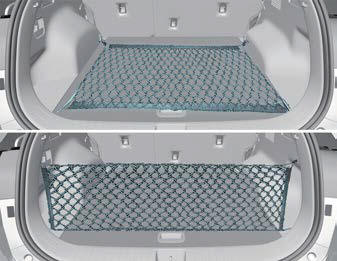
If necessary, contact an authorized Kia dealer.
CAUTION
To prevent damage to the goods or the vehicle, be careful when carrying fragile or bulky objects in the luggage compartment.
WARNING
DO NOT over-stretch the luggage net and ALWAYS keep your face and body out of the luggage net's recoil path. Failure to comply with these instructions may result in severe facial injuries. DO NOT use the luggage net when the strap has visible signs of wear or damage.
Cargo security screen
Use the cargo security screen to hide items stored in the cargo area.
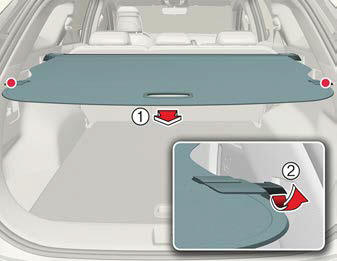
- Cargo security screen handle
- Cargo security screen guide
To use the cargo security screen, pull the handle backward and insert the edges into the slots.
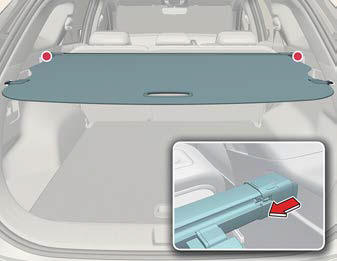
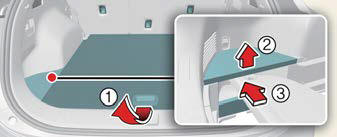
When not in use cargo security screen, follow below steps.
- Push the guide pin in the direction.
- Pull the cargo security screen out.
- Open the luggage board(1) and side tray cover (2) and keep the cargo security screen in the tray (3) (if gasoline engine and mini temporary spare tire equipped in luggage).
WARNING
- Do not place objects on the cargo security screen. Such objects may move around inside the vehicle and possibly injure vehicle occupants during an accident or when braking.
- Never allow anyone to ride in the luggage compartment. It is designed for luggage only.
- Maintain the balance of the vehicle and locate the weight as forward as possible.
NOTICE
- Since the cargo security screen may be damaged or malformed, do not put luggage on it when it is used.
- Pull out the cargo security screen using the handle in the center to prevent the guide pin from falling out of the guide.
- The cargo security screen may not
automatically slide back in if the cargo
security screen is not fully pulled out.
Fully pull it out and then let go.
READ NEXT:
 Exterior features
Roof rack
If the vehicle has a roof rack, you can
load cargo on top of your vehicle.
Type A
Type B
* The actual shape may differ from the
illustration.
Crossbars and fixing components
need
Using the infotainment/climate switchable controlle
NOTICE
If you install an aftermarket HID head
lamp, your vehicle's audio and electronic
device may malfunction.
Using the infotainment/climate switchable
controller
Press the button on
SEE MORE:
Balance Shaft & Oil Pump
Components and
Components Location
Components
Balance shaft & oil pump
assembly
Balance shaft chain tensioner
Balance shaft chain
Balance shaft chain sprocket
Balance shaft chain guide
Balance shaft chain tensioner arm
Oil cooler
Oil filter
Repair procedures
Rem
Description and Operation | Catalytic Converter | CVVT (Continuously Variable Valve Timing) System
Description
Exhaust emissions (CO, HC, NOx) are controlled by a combination of engine modifications and the addition of special control components.
Modifications to the combustion chamber, intake manifold, camshaft and ignition system form the basic control system.
These items have been i
Content
- Home
- Kia Sportage - Fifth generation (NQ5) - (2022-2026) - Owner's Manual
- Kia Sportage - Second generation (JEKM) (2005-2015) - Body Workshop Manual
- Kia Sportage Third generation (SL) - (2011-2016) - Service and Repair Manual
- Sitemap
- Top articles
