Kia Sportage: Start/Stop Button | Fob Holder
Components and Components Location
Component
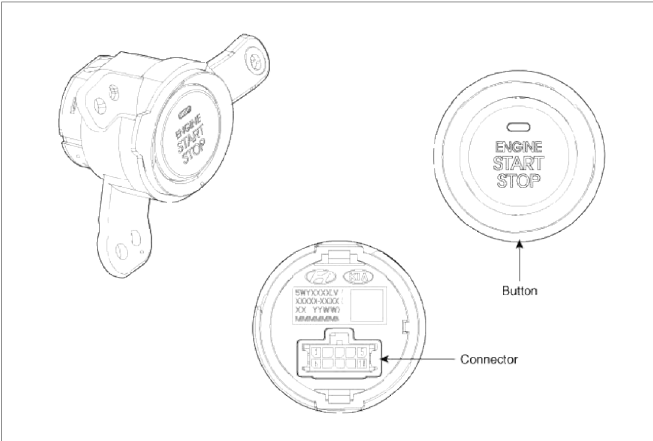
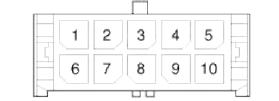 Connector (10 pins)
- Start stop button switch 1
- LED illumination power
- Amber LED
- Start stop button illumination GND
- Start stop button illumination Power
- Ground
- Start stop button switch 2
- Green LED
- Rheostat
- -
Repair procedures
Removal
1. Disconnect the negative(-) battery terminal.
2. Remove the cluster fascia panel. (Refer to the BD group - "Crash pad")
3. Disconnect the connector (A).
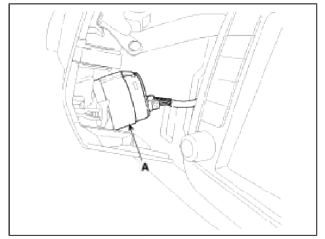
4. Remove the start/stop button (A) after loosening the mounting 3 screws.
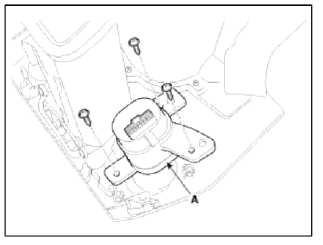
Installation
1. Install the start/stop button.
2. Install the left aft vent.
Fob Holder
Components and Components Location
Component
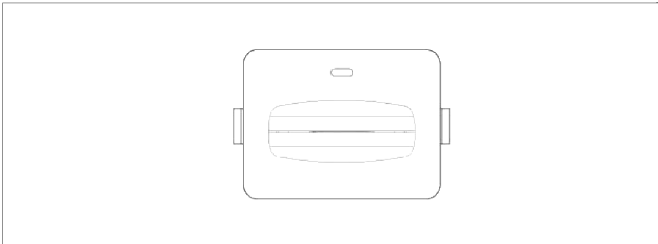
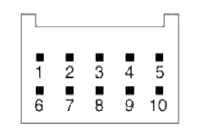 Connector (10 pins)
- -
- Immobilizer dock
- Holder illumination
- GND
- GND
- Battery
- Immobilizer data
- Illumination battery
- Fob in
- -
Repair procedures
Removal
1. Disconnect the negative (-) battery terminal.
2. Remove the floor console. (Refer to the BD group - "Console")
3. Disconnect the connector (B), then remove the fob holder assembly (A) after releasing the hook (C).
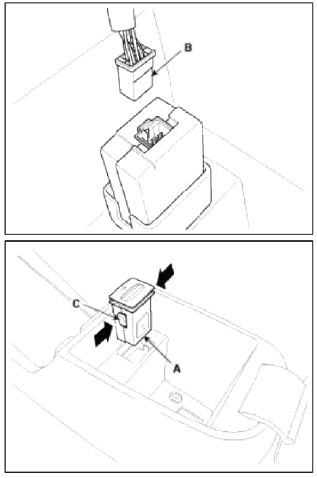
Installation
1. Install the fob holder assembly.
2. Install the floor console.
3. Install the negative (-) battery terminal
READ NEXT:
 Ignition Switch Assembly
Repair procedures
Inspection
1. Disconnect the ignition switch connector (B) and key warning switch
connector (A) from under the steering column.
2. Check for continuity between the ter
Back View Camera System
Components and Components Location
Component Location
Back view camera
ECM mirror
Schematic Diagrams
Circuit Diagram
Back view camera connector
Power
Video (+)
Gr
SEE MORE:
In case of an emergency
If the electrical power door lock switch is
not operating (e.g., dead car battery) the
only way to lock the door(s) is with the
mechanical key from the outside key
hole.
Doors without an outside key hole can
be locked as follows:
Open the door.
Insert the key into the emergency
Driving at night/ Driving in the rain
Driving at night
Because night driving presents more
hazards than driving in the daylight,
here are some important tips to remember:
Slow down and keep more distance
between you and other vehicles, as it
may be more difficult to see at night,
especially in areas where there may
no
Content
- Home
- Kia Sportage - Fifth generation (NQ5) - (2022-2026) - Owner's Manual
- Kia Sportage - Second generation (JEKM) (2005-2015) - Body Workshop Manual
- Kia Sportage Third generation (SL) - (2011-2016) - Service and Repair Manual
- Sitemap
- Top articles
