Kia Sportage: Components of the Tire Mobility Kit
Kia Sportage - Fifth generation (NQ5) - (2022-2026) - Owner's Manual / What to do in an emergency / If you have a flat tire (with tire mobility kit) / Components of the Tire Mobility Kit
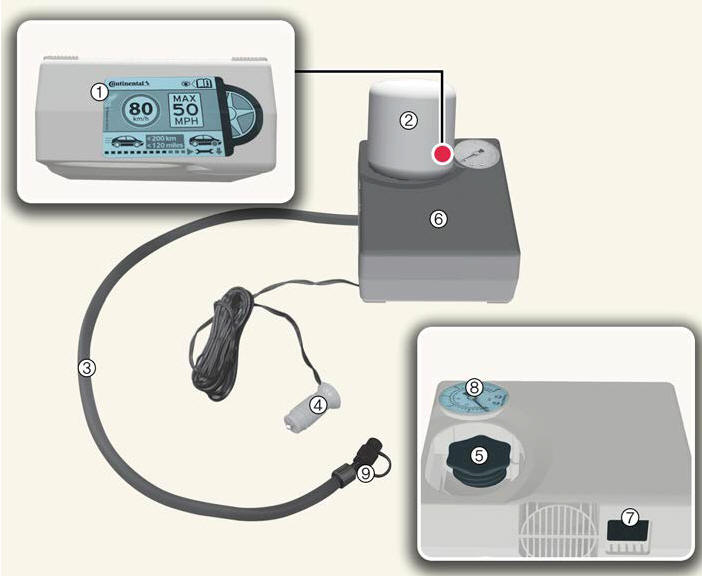
- Speed-restriction label
- Sealant bottle and label with speed restriction
- Filling hose from sealant bottle to wheel
- Connectors and cable for the power outlet direct connection
- Holder for the sealant bottle
- Compressor
- ON/OFF switch
- Pressure gauge for displaying the tire inflation pressure
- Valve for reducing the tire inflation pressure
* Connectors, cable and connection hose are stored in the compressor housing.
* Strictly follow the specified sequence, otherwise the sealant may escape under high pressure.
WARNING
Expired sealant
Do not use the Tire sealant after the sealant has expired (i.e. past the expiration date on the sealant container). This can increase the risk of tire failure.
WARNING
Sealant
- Keep out of reach of children.
- Avoid contact with eyes.
- Do not swallow.
READ NEXT:
 Using the Tire Mobility Kit
CAUTION
Detach the speed restriction label from
the sealant bottle, and place it in a highly
visible place inside the vehicle such as
on the steering wheel to remind the
driver not to drive too f
Distributing the sealant
Immediately drive approximately 4 ~
6 miles (7 ~ 10 km or, about 10min) to
evenly distribute the sealant in the
tire.
CAUTION
Do not exceed a speed of 50 mph (80
km/h). If possible,
SEE MORE:
Specifications, Components and Components Location, Description and Operation | Auto Light Sensor
Specifications
Specifications
Components and Components Location
Component Location
Auto light sensor
Head lamps
Lighting switch (Auto)
Tail lamps
SJB (Smart Junction Box)
BCM (Body Control Module)
Schematic Diagrams
Circuit Diagram
Defroster
The vehicle is equipped with a defroster
for removing frost or fog from the rear
window.
CAUTION
Conductors
To prevent damage to the conductors
bonded to the inside surface of the rear
window, never use sharp instruments or
window cleaners containing abrasives to
clean the window.
If you w
Content
- Home
- Kia Sportage - Fifth generation (NQ5) - (2022-2026) - Owner's Manual
- Kia Sportage - Second generation (JEKM) (2005-2015) - Body Workshop Manual
- Kia Sportage Third generation (SL) - (2011-2016) - Service and Repair Manual
- Sitemap
- Top articles
