Kia Sportage: Preparation of assembly
Kia Sportage - Second generation (JEKM) (2005-2015) - Body Workshop Manual / General information / For best results / Preparation of assembly
Applying spot sealer
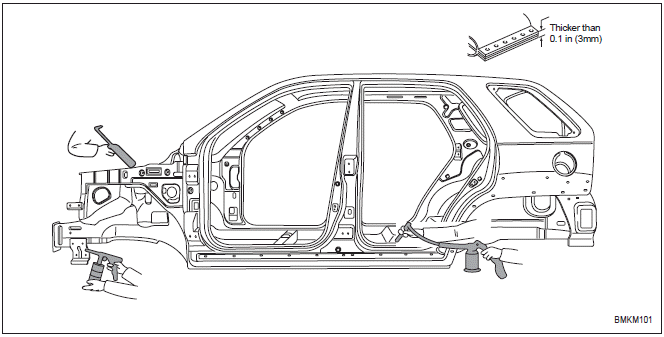
Remove paint from the surface of new parts and body to be spot welded, and apply spot sealer for rustproofing.
Selecting a welding method
If the thickness of the area to be welded with the panels overlapped is greater than 0.1 in (3 mm), do plug welding using a carbon arc welding machine.
Machining holes for plug welding
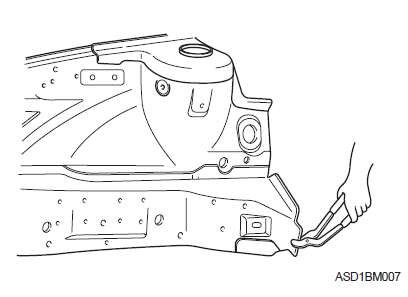
Drill a hole of approximately 0.2~0.24 in (5~6 mm) in diameter in those areas which are not suitable for spot welding.
Adjusting a new part
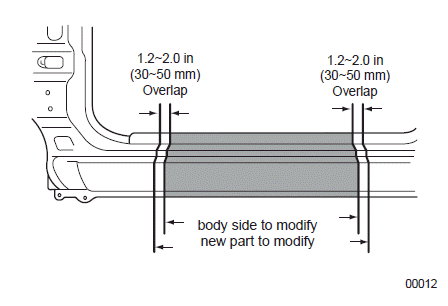
The new part should be cut larger than the repair area, overlapping the repair area by 1.2~2.0 in (30~50 mm).
READ NEXT:
 Assembly
Measuring dimensions before welding
When assembling a new part, assemble it according to the body dimensions
given in Section 31, and start welding
after checking the gaps with nearby parts.
Caut
Rustproof treatment after assembly
Body sealing
Apply body sealer where necessary.
Applying rustproof material
Apply rustproofing material (wax, oil, etc.) behind welded area.
Applying undercoat
Apply undercoat on the body where
Vehicle lift (2-Support type) and safety stand positions
1. Place the lift blocks under the support points as shown in the
illustration.
2. Raise the hoist a few inches and rock the vehicle to be sure it is firmly
supported.
3. Raise the hoist to fu
SEE MORE:
Specifications, Components and Components Location, Description and Operation | Auto Light Sensor
Specifications
Specifications
Components and Components Location
Component Location
Auto light sensor
Head lamps
Lighting switch (Auto)
Tail lamps
SJB (Smart Junction Box)
BCM (Body Control Module)
Schematic Diagrams
Circuit Diagram
AUTO STOP
Timer
AUTO STOP display shows the elapsed
time of engine stop by Idle Stop and Go
(ISG) system.
If the ISG does not operate, the reason
for the non-operation is displayed. (if
equipped)
For more details, refer to "Idle Stop and
Go (ISG) system"
Digital speedometer
This d
Content
- Home
- Kia Sportage - Fifth generation (NQ5) - (2022-2026) - Owner's Manual
- Kia Sportage - Second generation (JEKM) (2005-2015) - Body Workshop Manual
- Kia Sportage Third generation (SL) - (2011-2016) - Service and Repair Manual
- Sitemap
- Top articles
